Close Menu
  • Home
  • Business
  • Entertainment
  • Fashion
  • Finance
  • Health
  • News
  • Tech
  • Tips
  • Travel

Subscribe to Updates

Get the latest creative news from Harshji about News, Design and Business.

Facebook X (Twitter) Instagram
HarshjiHarshji
Facebook X (Twitter) Instagram
Contact
  • Home
  • Business

    Latest JPMorgan Report: Warning Signals for Markets

    March 11, 2026

    Why Small Businesses Are Exploring Crypto Payments

    October 4, 2025

    How Do Local Rules Shape the Workplace for Businesses and Staff?

    September 29, 2025

    6 Day Trading Strategies That Actually Work for Beginners

    September 1, 2025

    Everything To Know About Transferring Your Mortgage

    June 24, 2024
  • Entertainment

    Best Time to Visit Komodo National Park

    August 4, 2024

    Share Your Passions in Private with LivCam: Experience the Freedom of Free Video Chat

    May 24, 2024

    LivCam: Enjoy Live Random Video Calls for Free in a Safe Online Environment

    May 24, 2024

    Why Charlotte Is A Great City For LGBTQ Couples

    April 2, 2024

    Understanding RTP in Online Money Games: The Secret Sauce to Not Breaking the Bank!

    January 25, 2024
  • Fashion

    Sparkly Style Inspiration: Bridal Necklace Ideas for the Modern Bride

    July 25, 2024

    6 Essential Accessories for a Polished Look

    June 12, 2024

    What to do With Your Summer Wedding Photos

    June 3, 2024

    7 Cute Hand Tattoo Designs That Will Work As Your Inspiration

    May 11, 2024

    From Monograms to Charms: Personalize Your Style with Necklaces

    April 19, 2024
  • Finance

    Bad Credit Got You Down? Can You Still Qualify for a Personal Loan?

    February 16, 2024

    Banks vs NBFCs

    December 11, 2023

    Data Science in Financial Services: Predictive Analytics for Investment and Risk Management

    November 8, 2023

    FlyFish Review – Why This Financial Service Provider is worth Trying for Business Owners

    November 4, 2023

    Unlocking Financial Freedom with Unity Small Finance Bank

    October 21, 2023
  • Health

    What Makes Self-Defense Training Useful In Everyday Situations

    April 20, 2026

    Supportive Care During Cancer Treatment in Turkey

    March 10, 2026

    Navigating the Costs of Lipid Profile Tests: Insights for Different Cities

    August 19, 2024

    5 Health Benefits of Hormone Testing

    June 4, 2024

    How A High-Quality Stool Test Can Help Keep Your Gut Healthy

    June 2, 2024
  • News

    Upgrade Your Bathroom Experience with the Horow Bidet Toilet Seat with Dryer

    August 23, 2024

    Exploring Bangalore: Your Ultimate Guide to Staying at the Best Backpackers Hostel

    June 24, 2024

    5 Thoughtful Employee Gift Ideas That Won’t Break the Bank

    June 22, 2024

    Why It’s Important to Maintain Your Airplane’s Brakes

    May 14, 2024

    Transform Your Space with Stylish Blue Wallpaper for Your Home

    April 22, 2024
  • Tech

    The Ultimate Beginner’s Guide to Using a Profile Picture Generator

    October 7, 2025

    Unveiling the Magic of LivCam : Your Ultimate Omegle Alternative

    July 31, 2024

    IOC in Cyber Security: Detecting and Responding to Cyber Threats Effectively

    July 30, 2024

    Understanding VPS Hosting Costs: What to Expect

    July 25, 2024

    Unleash the Freedom to Explore: A   Step-by-Step Guide to How to Get a Free esim

    June 5, 2024
  • Tips

    The Importance of Electronic Logging Devices in Trucking Accidents

    February 6, 2025

    Jintropin: An In-Depth Analysis of Its Benefits and Applications

    September 13, 2024

    Mayday Gun Range: A Guide to Shooting Sports Equipment

    August 30, 2024

    Embrace Sustainability with Horow: The Eco-Friendly Toilet and Bidet Combo

    July 26, 2024

    Where Can I Find Unique Pearl Rings Online In The US?

    June 8, 2024
  • Travel

    Luxury Travel Experiences at Phuket All-Inclusive Resorts

    May 24, 2026

    Discovering the Charms of Thailand: Flights from Abu Dhabi to Bangkok

    May 13, 2024

    6 Key Issues Encountered by Railway Passengers- Pre & Post Train Ticket Reservations

    March 7, 2024

    Everything You Need To Know About Lodging Accommodations In The Mountains

    February 24, 2024

    Historical, Clothing, Health and fitness for Mount Logan

    February 7, 2024
HarshjiHarshji
Home | Don’t Use the Same QR Code to Pay Twice: Easy Tips to Stay Safe
All

Don’t Use the Same QR Code to Pay Twice: Easy Tips to Stay Safe

By PaulNovember 7, 20256 Mins Read
Facebook Twitter Pinterest LinkedIn Tumblr WhatsApp Telegram Email
do not use the same qr code to pay multiple times
Share
Facebook Twitter LinkedIn Pinterest Email Reddit

Let’s talk about QR codes. You know those square things you scan to pay? They’re super handy. Just scan and boom, paid! You use them for food, bills, and shops. But here’s the thing. Using the same QR code twice? Bad idea. Really bad.

Some folks save QR codes. They think “I’ll use this later.” Nope. Don’t do it. You might lose money or pay the wrong person. Yikes! Let me show you why this happens and how to stay safe.

What’s a QR Code Payment?
do not use the same qr code to pay multiple times 1

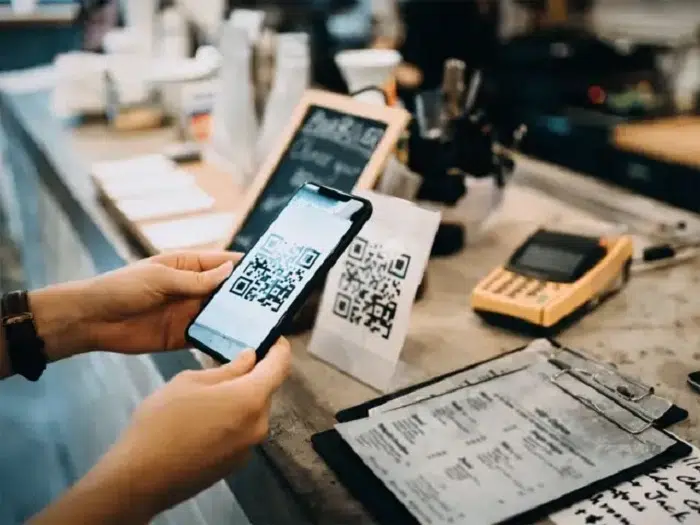
Think of a QR code like a bar code, but square. It holds payment info. You scan it with your phone, then you pay. Simple!

There are two types:
• Fixed QR code: Same info every time. Small shops use these.
• Changing QR code: New info each time. Big stores use these. Way safer!

How QR Payments Work

It’s easy. Like, really easy:

  • You scan the code. 
  • Your app reads it. 
  • You check the amount. 
  • You hit “pay.” 
  • Done! You get a receipt. 

Each time should use a new code. That’s the safe way.

Why Not Use the Same Code Twice?

Think you can save a code and use it later? Nope. Here’s why that’s bad:

  • The code dies
    Some codes work once. That’s it. Try again? Won’t work. Or worse, send money somewhere else.
  • You pay twice
    Scan the same code twice? You might pay twice without knowing. That hurts.
  • Bad guys trick you
    Crooks copy old codes. They change them. Your money goes to them. Not cool.
  • Apps get confused
    Old codes mess up your app. Payments fail or get stuck. Super annoying.
  • No proof
    Each payment needs its own ID. Reuse a code? No clear record. Good luck getting money back.

What Can Go Wrong?

Let me tell you a story. You buy stuff online. Scan the code. Pay. All good. Next week you try that same code. But now it’s dead or changed. Your money? Gone to who knows where. No order. No proof. Just gone.

How Bad Guys Get You

Crooks love QR codes. Know why? They’re easy to fake. Here’s their trick:
• They send you an old code.
• You think it’s real.
• You pay them instead.
• Your money? Gone.

They also stick fake codes on real ones at parking spots or cafes. That’s why old codes are risky.

Check Before You Scan

Every time, and I mean EVERY time, do this:
• Look at the code. Clean? Not torn?
• Check who gets paid. The right name?
• Know who sent it? If not, don’t scan.
• Use good apps only.
• Ask if it’s still good.

Fixed vs Changing Codes

Remember these two types? Here’s the deal:
• Fixed code – same every time. You type the amount. Less safe. Can be faked easily.
• Changing code – new each time. Amount’s already there. Pay once? It dies. Much safer!

What If You Reuse a Code?

Bad stuff happens:
• Payment fails. Code’s dead.
• Money goes wrong.
• Payment gets stuck.
• The bank thinks you’re sketchy.
• No proof of payment.

Your account might even freeze. Scary!

Safe QR Payment Tips

Do this every time:
• Fresh code for each payment.
• No screenshots to use later.
• Don’t share payment codes.
• Delete old code pics.
• Keep receipts.
• Use safe wifi.

For Shop Owners

Got a shop? Listen up:
• Use changing codes. Always.
• Don’t post the same code online.
• Check payments came in.
• Train your team to check.
• Use real payment apps only.

This keeps you and buyers safe.

For Buyers

Shopping? Do this:
• Check who you’re paying.
• No old code pics.
• Wait for the “paid” message.
• Payment failed? Check history first.
• Use bank apps, not random ones.

Oops, Used the Same Code Twice?

Already did it? Here’s what to do:
• Check if you paid twice.
• Call your bank now.
• Tell the shop. Show proof.
• Looks fishy? Block your card.
• Tell the fraud team.

Quick action saves money!

Real Story Time

A guy saved a cafe’s code. Weeks later, used it again. But the cafe changed accounts. His money? Lost. No way to track it. See why fresh codes matter?

QR Payment Myths
do not use the same qr code to pay multiple times 2

  • Myth: One code works forever.
    Nope. They die or change.
  • Myth: All codes are safe.
    Wrong. Crooks fake them easily.
  • Myth: Reusing saves time.
    Maybe. But you might lose money.
  • Myth: All codes are the same.
    Each one’s different. Don’t guess.

Stay Safe Online

  • Update your phone.
    • Get security apps.
    • Don’t share payment codes.
    • Skip codes from emails.
    • Log out when done.

What Banks Do Now

Banks got smart. They warn about old codes. Some apps block dead codes. They show who gets paid. But still, you gotta check!

Lost Money to Scams?

  • Tell your bank fast.
    • Call cyber crime help.
    • Share proof. Screenshots help.
    • Watch your account close.

Quick action means a better chance to get money back.

Stop Problems Before They Start

QR codes are great, but be smart. One mistake can mean a big loss. So scan new codes only. Don’t save them. Don’t reuse them.

Shops, change your codes often. Buyers, check every time.

Extra Tip for Everyday Users

If you often pay through QR codes at the same places, like your local grocery store or café, don’t rely on old saved screenshots. Always ask the shop owner to show the current code before you scan. Some shops update their QR regularly for security. They also switch to new bank accounts. By scanning the latest one each time, you protect yourself from failed transactions. It also makes sure your money goes to the right person instantly.

QR codes make life easy. But like all tech, they need care. Use the same code twice and you risk:
• Paying wrong person
• Getting scammed
• Failed payments

Stay safe:
• New code each time
• Check who gets paid
• Keep proof
• No old codes

Small steps, big safety. That’s how you keep your money safe and your mind happy!

Share. Facebook Twitter Pinterest LinkedIn Email Reddit
Previous ArticleHow to Use Format Painter Lots of Times: Easy Guide for All
Next Article Can We Vote Lots for Bigg Boss OTT 2? Here’s the Truth (Made Easy)
Paul
  • Website

Hey there, I'm Paul – your guide to the world of wisdom and inspiration on Harshji.com. Join me on this journey as we explore the depths of knowledge and the heights of personal growth. Let's embark on a quest for insight and inspiration together!

Related Posts

Elevating the Fan Experience: Data Processing and Connectivity in Football Fandom

May 15, 2026

Subtle Habits That Improve Your Online Gaming Journey

April 4, 2026

Thoughtful Approaches To Staying Mindful While Online Gaming

March 28, 2026

Essential Tips For Safer And Smarter Online Gaming

March 10, 2026

 12 Beginner Questions About Online Game Explained

January 20, 2026

ILYSM Meaning: What It Really Means, How to Use It, and Why People Love Saying It

January 6, 2026
Add A Comment

IOC in Cyber Security: Detecting and Responding to Cyber Threats Effectively

July 30, 2024

Embrace Sustainability with Horow: The Eco-Friendly Toilet and Bidet Combo

July 26, 2024

Sparkly Style Inspiration: Bridal Necklace Ideas for the Modern Bride

July 25, 2024

Understanding VPS Hosting Costs: What to Expect

July 25, 2024

Everything To Know About Transferring Your Mortgage

June 24, 2024
Popular Items
Our Picks

Column Symbol: What It Is, Where You’ll See It, and How to Type It

November 19, 2025

The Ultimate Beginner’s Guide to Using a Profile Picture Generator

October 7, 2025

Why Small Businesses Are Exploring Crypto Payments

October 4, 2025
Follow Us
  • Facebook
  • Twitter
  • Pinterest
  • Instagram
  • LinkedIn
  • Reddit
Harshji.com © 2026 All Right Reserved
  • Privacy Policy
  • Contact us
  • Sitemap

Type above and press Enter to search. Press Esc to cancel.